An exciting new feature that has been at the top of the request list is Event Scheduling. Using the flexible and powerful Rules Designer in version 3.3, you can now build rules to automatically schedule events.
There are several workflow methods which offer a customized way of handling your study calendar.
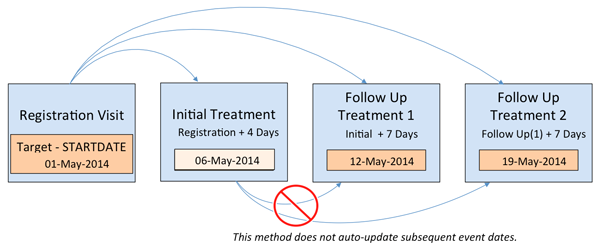
Method 1 – Manual Reschedule
In Method 1, a series of study events can be scheduled at once off a given event date. Any subsequent changes to event dates will not be automatically rescheduled. You can use arithmetic to generate future event dates (e.g. Visit 2 date = Visit 1 + 7). OpenClinica also supports use of static dates and the system’s “current date” variable.
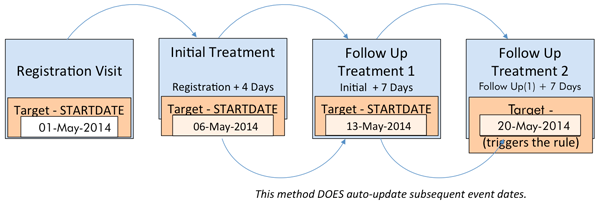
Method 2 – Auto Reschedule
In Method 2, a given event date generates all future visits and any changes to an event date in the chain will automatically update subsequent event dates.
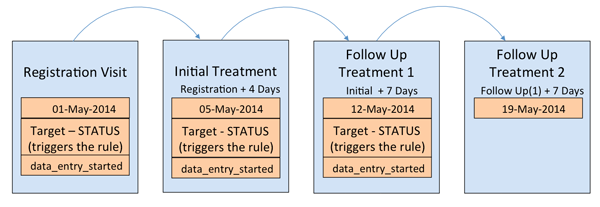
Method 3 – Auto Reschedule Based on Event Status
OpenClinica also allows you to write EventAction rules using the event STATUS. This opens the door to more calendaring power! Here, you can schedule an Event based on the status of another Event. For example, if a critical visit is skipped the system can auto-schedule the End of Study visit. Or let’s say you only want the next event to be scheduled when the current event is “Completed” (or “Started”). This is all possible–it’s really up to you.
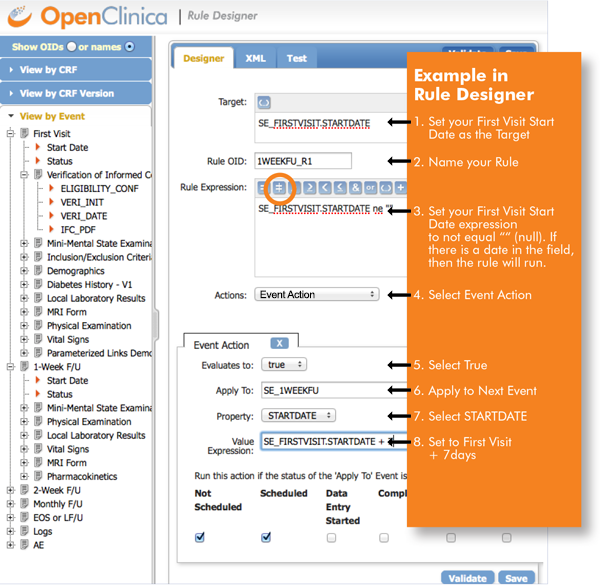
Rule Designer Example
See the following example of scheduling the next event with Rule Designer.
If you haven’t heard, the OpenClinica Rule Designer is now freely available. See here for more details.
Learn more about Event Scheduling with Rule Designer HERE.